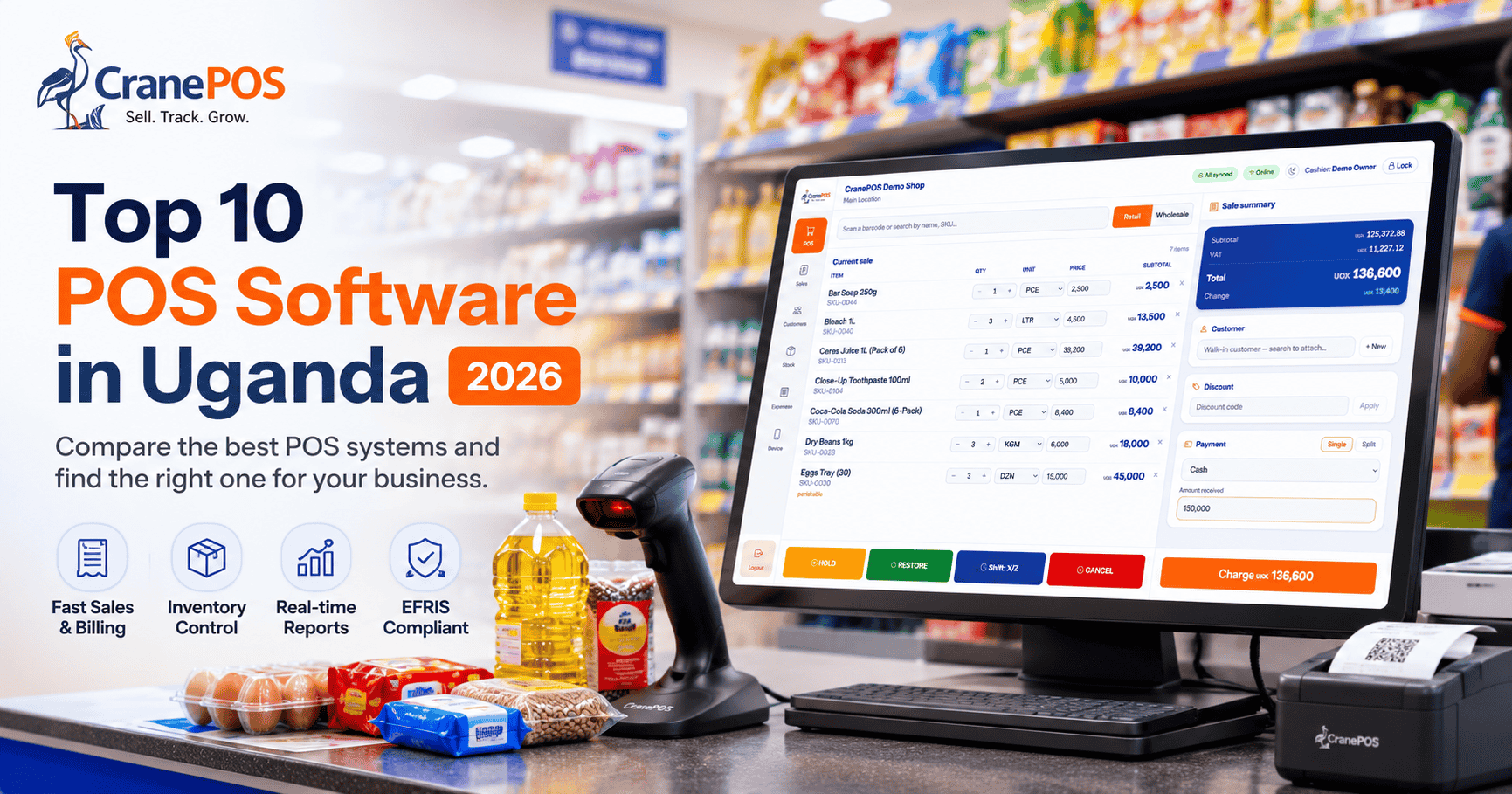
CranePOS earns the top position because it combines sales, inventory, purchasing, expenses, staff controls, customer accounts, multi-branch management, offline operation and native EFRIS integration in one platform. It is suitable for businesses of all sizes ranging from small retail shops, supermarkets, pharmacies, hardware stores and wholesale businesses.
Choosing the right point-of-sale software can transform how a business handles sales, stock, staff, expenses and customer service.
However, not every POS system is built for the realities of doing business in Uganda.
A reliable POS system should help you process sales quickly, manage inventory, monitor employees, track purchases and expenses, understand profitability and continue operating when the internet is unreliable. For VAT-registered businesses, EFRIS integration is also an important requirement.
In this guide, we look at 10 POS software options available to businesses in Uganda in 2026.
Our top recommendation is CranePOS, a complete point-of-sale and business-management system built specifically for Ugandan retail & wholesale businesses, pharmacies, supermarkets, and hardware stores.
Best for: Retail shops, supermarkets, pharmacies, hardware stores, boutiques, electronics shops, wholesalers and multi-branch businesses.
Starting price: UGX 600,000 per year.
CranePOS is our best overall POS software in Uganda because it combines nearly everything a modern retail or wholesale business needs in one system. It is not only a checkout screen.
CranePOS helps businesses manage sales, inventory, purchases, suppliers, expenses, customers, staff, branches, quotations, credit accounts, reports and EFRIS Integration from a single platform.
Many POS systems provide some of these capabilities. CranePOS brings them together into one complete solution built around the day-to-day realities of Ugandan businesses.
CranePOS stands out because it covers the full flow of stock and money through a business.
A business can use CranePOS to:
Instead of using separate systems for stock, sales, EFRIS, expenses and staff accountability, a business can manage everything inside CranePOS.
CranePOS provides a clean, touchscreen-friendly sales interface designed for busy retail counters.
Cashiers can scan products, search the catalogue, apply authorised discounts, collect payments and print receipts within seconds.
Key POS features include:
The interface is designed to be easy for new staff to learn, reducing training time and keeping queues moving.
CranePOS updates stock whenever a sale, purchase, adjustment or transfer takes place.
Business owners can always see what is available, what is running low and where stock is located.
Inventory capabilities include:
This helps businesses avoid stock-outs, overstocking and unexplained stock differences.
CranePOS manages the full purchasing process.
Businesses can raise purchase orders, assign them to suppliers, receive goods and automatically update stock when deliveries arrive.
Purchase-management features include:
This provides a clear record of where stock came from, what was ordered and what was actually delivered.
High sales do not always mean high profit.
CranePOS allows businesses to record expenses alongside revenue so owners can understand the real financial position of the business.
Reports include:
CranePOS helps business owners stop relying on guesswork and start making decisions based on actual numbers.
Each staff member can have an individual CranePOS account.
Business owners can decide exactly what each employee is allowed to see and do.
Permissions can control access to:
CranePOS also records staff activity, making it easier to identify who completed a sale, issued a refund, changed a price or adjusted stock.
This is particularly useful for businesses that want to reduce theft, unauthorised discounts and unexplained shortages.
CranePOS helps businesses build customer records and track customer activity over time.
Customer features include:
These capabilities are especially valuable for wholesalers, hardware stores and other businesses that sell to regular customers on credit.
CranePOS Premium and Fiscalised plans support businesses with multiple locations.
Each branch can maintain its own:
Management can view individual branch performance or see consolidated results for the entire business.
CranePOS also supports stock transfers between locations, helping businesses move products to branches where they are needed most.
CranePOS includes native EFRIS integration on the Fiscalised plan.
This means EFRIS is built directly into the POS. Businesses do not have to complete a sale in CranePOS and then recreate it manually in another system.
EFRIS capabilities include:
For VAT-registered businesses, this removes unnecessary duplication and reduces the risk of errors during fiscal invoicing.
CranePOS is designed around the practical needs of businesses operating in Uganda.
These include:
It is not a generic international POS with Uganda added as an afterthought.
Retail shops need a fast till, accurate stock and control over staff activity.
CranePOS helps retailers:
It is suitable for boutiques, phone shops, electronics stores, cosmetics shops, general merchandise shops and many other retail businesses.
Supermarkets process high transaction volumes and manage thousands of products.
CranePOS provides:
This helps supermarkets reduce queues, stock-outs, shrinkage and manual fiscal reporting.
Pharmacies require more than ordinary stock tracking.
CranePOS can help pharmacies manage:
This makes it easier to control medicine inventory and reduce losses from expired stock.
Hardware businesses sell products in many different units.
CranePOS supports products sold by:
Hardware stores can also use CranePOS to create quotations, prepare invoices, track customer credit, manage suppliers and monitor stock across a large catalogue.
Wholesale businesses often manage high volumes, customer credit, several branches and fiscal invoices.
CranePOS supports:
This gives wholesalers a clearer picture of stock, credit and margins across the business.
The CranePOS web application runs in a modern browser and can be accessed from computers, tablets and smartphones.
CranePOS also has offline-first native applications for:
The desktop and mobile applications are designed to store transactions locally during an internet outage and synchronise them automatically when connectivity returns.
Businesses that need immediate offline selling can download any of our application and start selling.
CranePOS uses annual pricing with no per-transaction charges.
The Starter plan is designed for small shops, market stalls and startups.
It includes:
UGX 600,000 per year is equivalent to UGX 50,000 per month.
The Premium plan is designed for growing businesses that need more control and scale.
It includes everything in Starter, plus:
The Fiscalised plan is designed for businesses requiring native EFRIS compliance.
It includes everything in Premium, plus:
All CranePOS plans include ongoing support.
Businesses can receive assistance through:
The CranePOS team can also help with onboarding, product setup, staff configuration and training.
CranePOS is the best overall POS software in Uganda for businesses that want one system to manage sales, inventory, purchases, expenses, customers, staff, branches, reporting and EFRIS.
Its UGX 600,000 annual starting price makes it accessible to small shops, while Premium and Fiscalised plans provide the capabilities needed by supermarkets, pharmacies, hardware stores, wholesalers and multi-location businesses.
UgaPOS is a locally available POS system offering sales, inventory and offline desktop functionality.
It may suit businesses that primarily want a traditional locally supported desktop POS.
Businesses comparing it with CranePOS should evaluate pricing, EFRIS, purchasing, customer credit, reporting and multi-branch requirements during a demonstration.
WEAF POS is another Uganda-focused system with offline capabilities.
It may appeal to businesses that prioritise desktop-based fiscal operations.
Prospective customers should confirm total implementation cost, recurring fees, available modules and support arrangements.
Novas 360 provides cloud-based sales, inventory, branch and employee-management capabilities.
It may be suitable for businesses looking for remote access and general cloud management.
Ugandan businesses should confirm offline selling, EFRIS support and industry-specific workflows before subscribing.
Posterita provides a free entry plan with essential POS features and additional paid plans.
It may work for very small businesses looking for a low-cost starting point.
Businesses that need native EFRIS, advanced purchases, customer credit and strong multi-branch controls should compare the paid capabilities carefully.
SimuPOS is a locally marketed POS and inventory platform for Ugandan SMEs.
It includes standard sales, inventory, reporting and branch-management capabilities.
Businesses should request a full demonstration and confirm EFRIS, offline operation, purchase orders and advanced reporting.
Loyverse is a free mobile POS available on Android and iOS.
It can be useful for small shops, stalls and businesses that need simple mobile checkout.
However, it does not include native Uganda EFRIS integration, and advanced inventory and employee features may require paid add-ons.
Odoo is a broad ERP platform with POS, inventory, purchasing, accounting, CRM and other business applications.
It is powerful and highly configurable, but implementation may require technical expertise, customisation and additional EFRIS integration.
It is generally better suited to businesses that need a full ERP rather than a ready-to-use Uganda-focused retail POS.
Smart POS provides standard retail functionality such as billing, invoicing, reports and customer management.
Businesses should confirm local support, EFRIS, offline operation and multi-branch capabilities before choosing it.
EzyPOS is a locally supplied POS option aimed at businesses such as supermarkets, boutiques, hardware stores and general retail shops.
Prospective buyers should confirm cloud access, backups, EFRIS, branch management, support and upgrade terms before purchasing.
The main difference between CranePOS and many alternatives is not one single feature.
It is the combination of capabilities in one platform.
CranePOS covers:
This makes CranePOS easier to grow with than a system designed only for basic billing or stock tracking.
Ask the provider to demonstrate what happens when the internet connection is switched off.
Confirm whether cashiers can still:
Do not rely only on the words “works offline.”
For VAT-registered businesses, confirm that the system can handle the full EFRIS workflow.
This may include:
Also establish whether EFRIS requires separate middleware or additional subscriptions.
A good POS should track how stock enters, moves through and leaves the business.
Look for:
Every employee should have an individual account.
The system should record who:
Shared accounts make it difficult to investigate shortages and unauthorised activity.
A proper multi-branch system should provide separate stock, sales, expenses, staff and reports for each location.
It should also provide consolidated reports for the entire business.
Businesses that sell on credit should be able to see:
The system should provide reports that help the business make decisions, not only record transactions.
Important reports include:
Confirm how support is provided and whether it is included in the subscription.
Local phone, WhatsApp and on-site support can be especially valuable during onboarding.
Ask about all possible charges, including:
The cheapest advertised price may not be the cheapest total solution.
POS software prices in Uganda vary depending on the number of users, products, branches and features required.
Free systems may be suitable for very small businesses with simple needs.
Paid local POS systems may cost from several hundred thousand shillings to several million shillings per year.
CranePOS pricing is:
CranePOS does not charge per transaction.
CranePOS is our best overall POS software in Uganda for 2026.
It combines sales, inventory, purchases, expenses, customers, staff permissions, credit tracking, multi-branch management, reports and native EFRIS integration.
CranePOS Starter costs UGX 600,000 per year, which is equivalent to UGX 50,000 per month when annualised.
It includes POS, stock management, customers, suppliers, expenses, reports, quotations, invoices and user permissions.
CranePOS provides native EFRIS integration through its Fiscalised plan.
Some other local POS providers also advertise EFRIS support. Businesses should confirm whether the integration is native, third-party or manual.
Yes.
CranePOS Premium and Fiscalised plans support multiple locations, branch-level stock, branch staff, stock transfers and consolidated reporting.
CranePOS is developing offline-first desktop and mobile applications for Windows, macOS, Linux, Android and iOS.
The web application is currently available. Businesses requiring offline functionality immediately should confirm the release status during their demonstration.
Yes.
CranePOS supports batch tracking, expiry dates, medicine inventory, supplier management, staff accountability and EFRIS invoicing.
Yes.
CranePOS supports flexible units of measure, customer credit, quotations, invoices, suppliers, large product catalogues and EFRIS.
No.
CranePOS uses annual subscription pricing and does not charge per sale or transaction.
No special hardware is required.
CranePOS can run in a browser on a computer, tablet or smartphone. Businesses may optionally use receipt printers, barcode scanners, cash drawers and dedicated POS terminals.
There are several POS software options available to Ugandan businesses in 2026.
Some provide basic billing. Some focus on offline desktop use. Others offer cloud inventory, free mobile checkout or large ERP implementations.
However, CranePOS is the strongest all-round option for Ugandan retail and wholesale businesses.
It combines:
With a starting price of UGX 600,000 per year, CranePOS gives small businesses an affordable way to move from paper to digital operations.
As the business grows, it can upgrade to Premium for unlimited scale and multiple branches or Fiscalised for native EFRIS integration.
The business does not need to change systems every time it reaches a new stage.
Discover how CranePOS can help you sell faster, control stock, monitor staff, manage expenses and understand your business performance.
Book a free demo on WhatsApp:
Explore more:
This comparison was published by CranePOS.
Competitor details are provided based on publicly available information. Features, pricing and availability may change, so businesses should contact individual providers for current details.
Share this article